



Commercial Zipline Carabiner Selection Guide
What if the strongest carabiner on paper is still the wrong connector for your zipline system? Commercial zipline carabiners connect specific components, so a strength marking alone can’t tell you whether a connector fits the connection, works with adjacent hardware, or meets the system’s instructions. Ratings matter, but so do shape, gate design, compatibility, and operating demands.
This guide explains how to evaluate carabiners by connection role, match them with pulleys, lanyards, and other equipment, and interpret product markings in context. You’ll also learn how to create a repeatable, system-led selection process using manufacturer documentation and operational requirements. Fusion Climb manufactures specialized safety hardware, including carabiners and related zipline equipment. Start with the connection, then assess the complete system.
Key Takeaways
- Start with the carabiner’s role in the system, not its strength marking alone.
- Use system documentation to review connector shape, gate operation, and equipment compatibility.
- Compare geometry, material, and gate style with the intended connection and operating demands.
- Use a repeatable purchasing checklist for commercial zipline carabiners, including documentation and inspection-process approval.
- Align carabiner selection with the pulleys, lanyards, and other safety hardware in the system.
Role of Carabiners in Zipline Safety Systems
Working definition: A carabiner is a load-bearing connector selected for a specific interface in an equipment system. Its suitability depends on the connection, the components it joins, and the system’s documented requirements. Keeping the role clear helps purchasing teams compare hardware by function instead of appearance or a strength figure viewed in isolation.
A carabiner is one component in a larger arrangement. Its markings and physical design provide useful information, but they don’t establish by themselves how it will function at a particular connection point. Selection must account for the other equipment and the way the system is intended to operate.
Where carabiners fit within a commercial zipline setup
In a commercial setup, connectors may interface with harnesses, lanyards, or pulley assemblies. The arrangement depends on the system design and its instructions, so don’t assume a connector suitable for one interface will also suit another. A harness connection and a pulley-related connection may differ in shape, clearance, movement, and handling requirements.
Think in terms of interfaces: identify the components being joined, then consider how the connector sits and operates between them. The pulley is part of this equipment relationship, not a substitute for evaluating the connector itself. A commercial zipline pulley guide can help frame the pulley’s place in the system. For broader background on connector types and uses, see the Carabiner overview.
The carabiner doesn’t define the complete safety system. System design, operating procedures, inspection practices, and the compatibility of all connected components each play a role. Treating the connector as one interface within that wider structure helps teams avoid expecting one piece of hardware to resolve questions that belong to the system as a whole.
Why commercial use changes the selection question
Commercial equipment may be handled repeatedly by staff and participants during regular operations. That makes the selection question broader than “Will this connector fit?” Consider the expected use, how the gate is operated and checked, and whether the connector remains compatible with the associated harness, lanyard, or pulley in the intended setup. Clear instructions and consistent procedures matter when equipment is handled repeatedly.
Commercial use doesn’t automatically point to one shape, material, or gate style. It sets the context for evaluation; system documentation and connection role guide the choice. A design that suits one application may not suit another, even if the connectors look similar or display comparable strength markings.
For purchasing teams, this gives commercial zipline carabiners a practical test: identify the intended connection, examine the associated equipment, and compare the connector with the system’s documented requirements and operating procedures. Appearance can prompt questions, and a marking can inform the review. Neither replaces a compatibility assessment.
How to Evaluate Commercial Zipline Carabiners for Compatibility
Use a consistent review process before adding or replacing a connector. Start with the system documentation, then work outward from the intended connection. This keeps decisions tied to the actual equipment and application rather than assumptions based on appearance or a prominent rating.
Start with the interface and system instructions
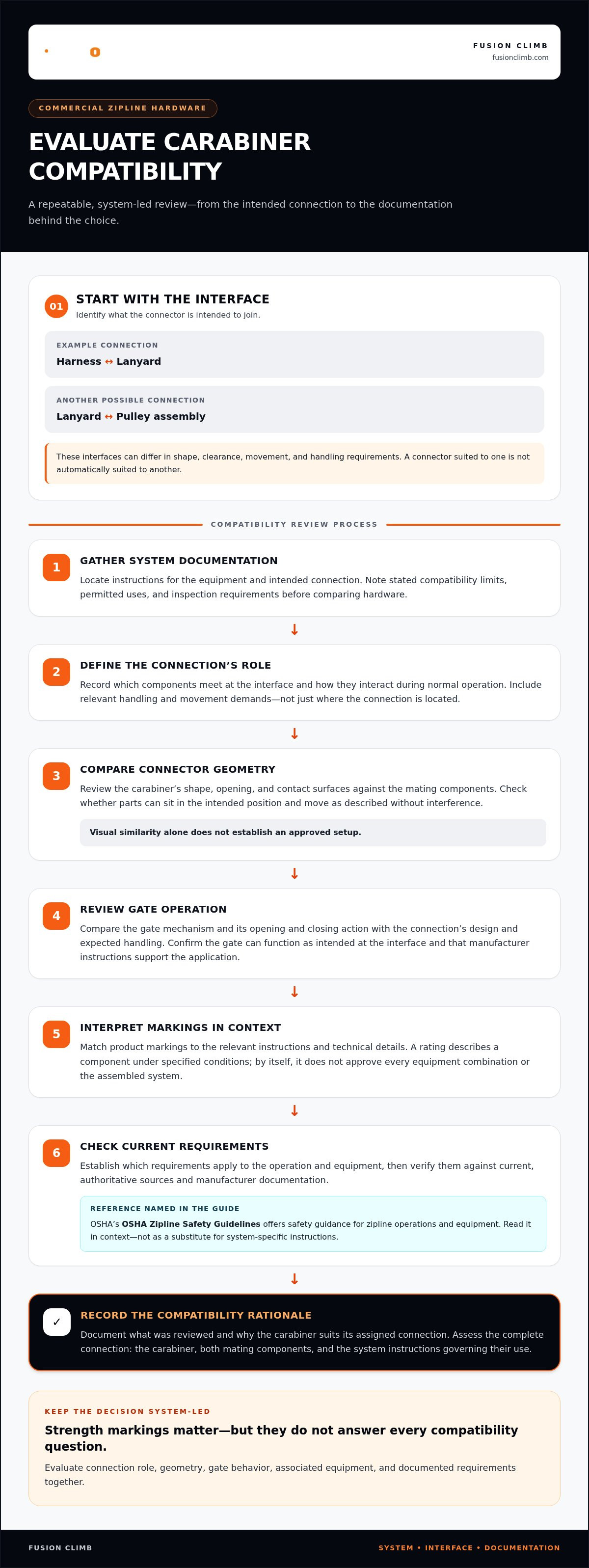
Identify the components the carabiner will join, such as a harness and lanyard or a lanyard and pulley assembly. Review how the connection is intended to be loaded and whether it needs to move, remain oriented, or interface with a particular attachment point. Follow the system and component manufacturers’ instructions. Similar-looking parts aren’t necessarily interchangeable.
- Gather the system documentation. Locate instructions for the equipment and intended connection. Note any stated compatibility limits, permitted uses, and inspection requirements before comparing hardware.
- Define the connection’s role. Record which components meet at the interface and how they interact during normal operation. Include relevant handling and movement demands rather than describing the connection only by its location.
- Compare connector geometry. Review the connector’s shape, opening, and contact surfaces against the mating components. Consider whether the parts can sit in the intended position and move as described without interference. Don’t infer an approved setup from visual similarity.
- Review gate operation. Compare the gate mechanism and its opening and closing action with the connection’s design and expected handling. Confirm that the gate can function as intended at the interface and that the manufacturer’s instructions support the application.
- Interpret markings through documentation. Match markings to the relevant product instructions and technical details. A rating describes a component under specified conditions; on its own, it doesn’t approve every equipment combination or the assembled system.
- Check current requirements. Establish which requirements apply to the operation and equipment, then verify them against current, authoritative sources and manufacturer documentation. OSHA’s OSHA Zipline Safety Guidelines offers safety guidance for zipline operations and equipment. Read it in context, not as a substitute for system-specific instructions.
Assess compatibility across the complete connection, including the carabiner, both mating components, and the system instructions governing their use. A connector can appear to fit even when its geometry, gate behavior, or documented use doesn’t match the intended interface.
Record the documentation reviewed and why the connector suits its assigned connection. If a component changes, repeat the assessment rather than automatically carrying an earlier decision forward. A written record creates a practical basis for purchasing and helps teams compare options consistently.
For teams evaluating connectors alongside related zipline hardware, Fusion Climb carabiners are part of the specialized safety equipment the company manufactures.
Which Carabiner Characteristics Matter in Commercial Zipline Operations?
Compare each connector by the job it must perform, not by a universal ranking of shapes, gates, or materials. A feature that helps with handling at one connection may offer no advantage at another. For commercial zipline carabiners, ask whether the documented characteristics suit the intended interface and operating conditions.
Compare shape and gate operation by connection task
Geometry affects how a connector aligns with adjoining components and how much clearance is available at the interface. A shape that sits neatly at one attachment point might orient differently or interfere with movement at another. Gate operation matters too: consider how it opens and closes in the intended connection and whether its handling suits the established procedure. Consult product documentation for each design’s stated uses. For broader connector fundamentals, see this professional climbing carabiner guide.
| Characteristic | What to compare | Application question |
|---|---|---|
| Geometry | Shape, opening, contact surfaces, and clearance | Does the connector align and interface as intended with the adjoining equipment? |
| Gate operation | How the gate opens, closes, and is handled | Does its operation fit the connection and the operator’s procedure? |
| Material | Product documentation and material details | Does the material suit the operating environment and contact conditions? |
| Intended connection | Manufacturer-stated use and limitations | Is this specific application within the documented use? |
Assess materials and operational environment
Material is one selection factor, not a shortcut to deciding suitability. Steel and aluminum connectors can differ in weight and may be considered for different equipment roles, but neither material alone establishes that a particular carabiner is appropriate. Compare product documentation with how and where the connector will be used.
Consider expected handling, exposure to wear, and contact with neighboring equipment. A connector that repeatedly meets another component may face different contact conditions from one used at a separate interface. Don’t assume a material guarantees corrosion resistance, a set service life, or better performance in every setting. Use the manufacturer’s information and the operator’s inspection process to assess actual condition and use limits.
Ease of handling also matters, especially when staff need to operate and inspect equipment consistently. But an easy-to-use gate or familiar shape doesn’t establish compatibility. Keep the judgments separate: first consider whether the design can be handled as required, then determine whether it is documented for the intended connection. Don’t substitute appearance or convenience for product information.
A practical comparison records the interface, relevant geometry and gate characteristics, material details, and the manufacturer’s stated application. This makes differences between options visible without turning a design preference into a blanket rule. Select for the connection and operating environment, then keep the documentation behind that choice.
A Purchasing Checklist for Commercial Zipline Carabiners
Before placing an order, turn the system’s requirements into a written purchasing brief. It gives the team a consistent way to compare options, approve a component for its intended connection, and track what enters service. Use this checklist for commercial zipline carabiners, keeping the selection tied to documented equipment needs.
Document the requirement before ordering
Start with the connection, not a preferred connector style. Record the equipment being joined, its intended use, and the relevant manufacturer instructions. If the interface involves a lanyard or tether, account for how that component fits into the system. The zipline lanyards and tethers guide provides additional context for evaluating those connections.
Capture the product details required by the documentation, including markings and stated use limitations. Don’t infer suitability from a similar-looking connector or rely on a rating without understanding what the product documentation says it represents. Keep source documents with the purchasing record so the reasoning behind the choice remains clear.
- Application: State the connector’s assigned role and the operating conditions relevant to that use.
- Connection interface: Identify the exact components it will join and record any fit or compatibility requirements in the equipment instructions.
- Documentation: Note the product identification, required markings, manufacturer instructions, and specified limitations.
- Quantity and type: Match the order quantity and connector type to documented operational needs, including the equipment intended for use and any planned replacements.
- Approval: Route the proposed component through the operator’s established inspection process before placing it into service.
Review procurement and operational controls
Make the purchase record traceable to the equipment received and placed into service. Retain product identification and applicable documentation, and connect them to the operator’s inventory or inspection records. If the delivered connector differs from the one evaluated, pause the substitution and assess the changed component through the same documented process. Make maintenance and retirement decisions according to the relevant manufacturer instructions and the operator’s established procedures.
Plan quantities around how the equipment is assigned and managed. Separate connector types by their documented role, and don’t treat a surplus of one type as a substitute for another. Clear records help purchasing and operations teams maintain a shared understanding of which component belongs at each interface.
With the application, interface, documentation, quantity, and approval process defined, explore Fusion Climb’s commercial zipline hardware, including carabiners and related safety components.
Commercial Zipline Carabiners from Fusion Climb: Match Hardware to the System
Choosing a connector is a system decision. Fusion Climb manufactures specialized safety equipment for professional applications, including carabiners, harnesses, pulleys, lanyards, and tethers. These components serve related but distinct roles. A system-led selection connects each role to the intended interface and equipment instructions, rather than treating a carabiner as a standalone purchase.
Product information helps operators evaluate hardware, but it doesn’t replace application-specific review. No single product detail establishes that a connector suits every setup. The intended connection, adjacent components, and product documentation remain central to the decision.
A manufacturer perspective on connected safety equipment
A carabiner works at an interface. Its position in the equipment arrangement affects how it meets a harness, lanyard, tether, or pulley assembly. Reviewing these components together helps operators keep the connection in view: consider the connector alongside the equipment it joins, the documented use of that equipment, and the procedures governing the system.
This connected view is useful when planning or replacing equipment. A change to one component can affect the interface, so assess proposed hardware in relation to the actual equipment instead of assuming familiar form or appearance means equivalent use. A broader ropes course safety equipment guide adds operator context for considering how hardware fits within a wider equipment program.
For commercial zipline carabiners, combine the manufacturer’s product information with the operator’s system requirements. Markings and design details inform the review; they don’t replace checking the intended application and compatibility of the complete connection.
Take the next step with a system-led selection
Keep the process clear and repeatable. Identify the interface and intended use, review the relevant equipment instructions, and examine product details and markings against the operating requirements. Then bring the proposed component into the operator’s established review and inspection process. If the equipment or application changes, revisit the assessment instead of automatically relying on an earlier decision.
This method gives purchasing and operations teams a common basis for evaluating hardware. Manufacturer information helps inform the decision, while the system’s documented requirements define what the connection must satisfy. The result is a disciplined way to compare equipment without assuming one connector design is right for every interface.
Explore Fusion Climb’s carabiner range and review the product documentation as you match hardware to your system. Select with purpose, assess the complete connection, and keep safety at the center of every equipment decision.
Make Your Next Hardware Decision Deliberate
Turn your selection criteria into a working reference for your purchasing and operations teams. Record the connection each component is intended to serve, keep its product documentation accessible, and consider any proposed change within your established review process. That gives future decisions a clear starting point as equipment or operating needs evolve.
Fusion Climb manufactures specialized safety equipment, including carabiners and connectors. Use the product details alongside the requirements of your own system when selecting commercial zipline carabiners. Assess each component for its intended application and keep the decision grounded in the equipment documentation.
Explore Fusion Climb’s commercial zipline carabiners and safety hardware, then review the relevant product documentation as you plan your next equipment decision. Keep compatibility at the center of the process and choose hardware for the specific connection it is meant to serve.
Frequently Asked Questions
What makes a carabiner suitable for commercial zipline use?
A carabiner is suitable when its documented use matches the specific connection and the system’s operating requirements. Consider how it interacts with attached components, how its gate functions during routine handling, and whether its markings and instructions support the intended application. For example, don’t assume a connector assigned to a harness interface is also suitable for a pulley connection. Suitability depends on the complete equipment context, not a general label.
Can any climbing carabiner be used on a commercial zipline?
No. A carabiner designed for climbing isn’t automatically suitable for a zipline application, because its intended use and compatibility may differ from the operator’s system requirements. Compare the manufacturer’s instructions with the exact interface and equipment arrangement before considering a connector. For example, a climbing connector that fits through an attachment point may still have a shape or gate operation that doesn’t suit the connection. Physical fit isn’t approval.
How do I match a carabiner to a zipline pulley or lanyard?
Identify the exact parts being joined and consult the instructions for both pieces of equipment. Check how the carabiner sits at the interface, whether its movement or orientation is appropriate, and whether the gate can operate as intended. A pulley and a lanyard may have different attachment geometry, so don’t assume one connector works for both. Record the selected connector against the specific connection in the equipment inventory.
Are locking carabiners required for commercial zipline systems?
Not every commercial zipline connection can be assigned one gate style by default. The required mechanism depends on the system design, the connector’s documented application, and applicable requirements for that use. Check the equipment instructions and the operator’s governing procedures to establish whether a locking design is specified. If a connection requires particular gate behavior, a connector that merely appears secure or is familiar to staff isn’t a substitute for meeting that requirement.
What do carabiner strength markings mean for zipline operators?
Strength markings describe the connector’s rated performance under specified loading conditions, as defined in its product documentation. Read the label alongside those instructions, including details about loading direction and gate condition. Don’t interpret a single figure as a rating for every possible orientation or for the assembled zipline system. Keep relevant documentation with purchasing records so staff can interpret markings consistently when reviewing equipment.
How often should commercial zipline carabiners be inspected?
Follow the manufacturer’s inspection instructions and the operator’s established inspection schedule. A useful approach includes a pre-use check before equipment enters operation, plus more thorough periodic inspections at intervals set by applicable procedures and requirements. Staff should know how to report a concern, and inspection records should identify the connector. Frequency can depend on use and conditions, so don’t replace documented procedures with an arbitrary universal interval.
When should a commercial zipline carabiner be removed from service?
Remove a connector from service if inspection finds a crack, deformation, unusual wear, corrosion, a damaged gate, or another condition that conflicts with the manufacturer’s instructions. Also isolate it if its history is uncertain or it has experienced an event that calls its condition into question. Don’t return it to use based on appearance alone. Follow the manufacturer’s retirement guidance and the operator’s procedures for documenting and disposing of equipment removed from service.