



Zipline Safety Tethers for Operators: 2026 Practical Guide
Could a tether that looks suitable still create a mismatch in your zipline setup? Zipline safety tethers for operators work alongside the harness, trolley, and connectors. Choosing one by category alone can leave important questions about fit and compatibility unanswered. A clear, repeatable review helps operators assess those connections before equipment goes into use.
This guide explains the tether’s role and limits within the larger system, then offers a practical framework for evaluating fit, component compatibility, and operating conditions. It also covers ways to turn equipment instructions into consistent staff practices for handling, inspection, and recordkeeping.
Think of the tether as one part of a coordinated setup, not a standalone safety decision. Use the checks below to review how harnesses, pulleys, lanyards, and carabiners relate to one another, and to build everyday procedures around manufacturer instructions and clear documentation.
Key Takeaways
- Zipline safety tethers for operators are one component in a broader system. Assess their role alongside the harness, trolley, and connectors.
- Trace each connection in sequence and compare it with the intended use and equipment instructions.
- Compare fixed and adjustable tether configurations by function, adjustment needs, connection setup, and operating constraints.
- Build a consistent routine for pre-use checks, communicating equipment status, and documenting findings.
- Use a clear decision sequence to connect equipment choices with operating controls and recordkeeping.
Zipline safety tethers for operators: define the role before choosing gear
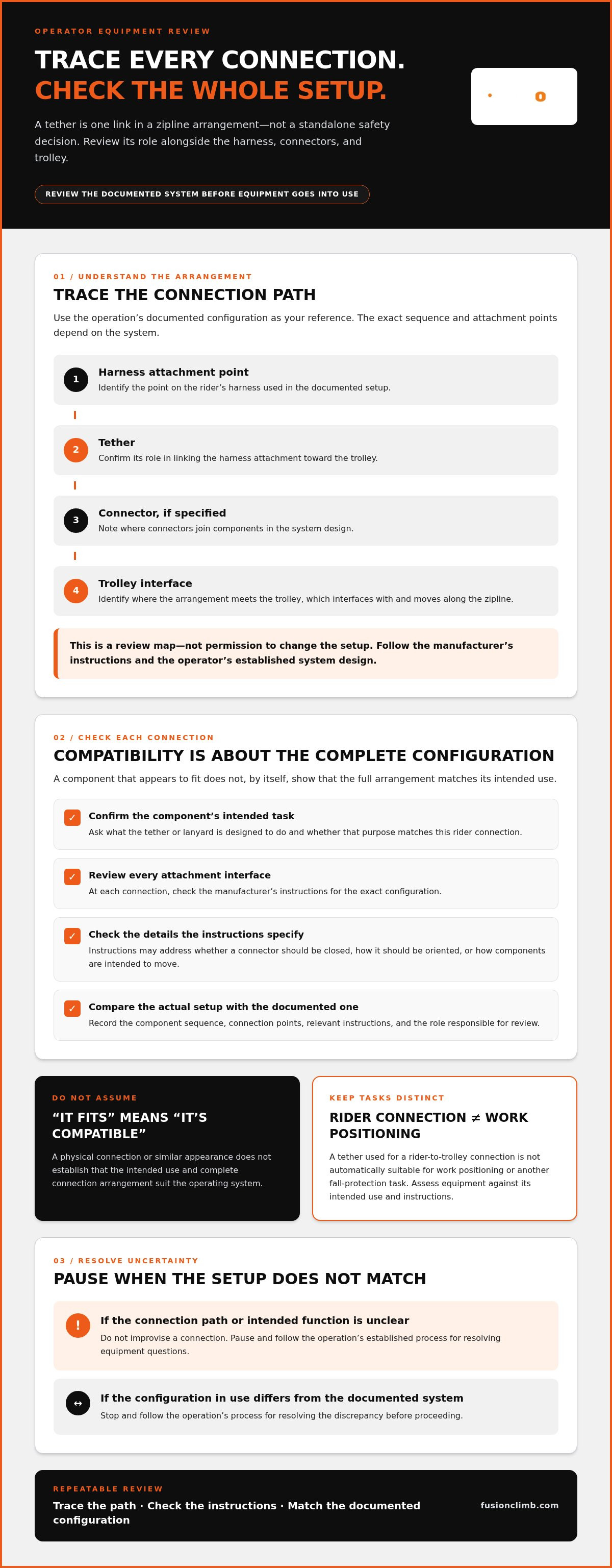
A tether is one link in a rider’s equipment arrangement, not a standalone safety system. In a typical connection path, the rider wears a harness, the tether links an attachment point on that harness toward the trolley, and connectors join components where the system design calls for them. The trolley interfaces with the zipline and moves along it. The exact sequence and attachment points depend on the system, so follow the equipment manufacturer’s instructions and the operator’s established system design. Don’t assume every setup uses the same arrangement.
A tether connects compatible parts of a zipline setup. Its role depends on the harness, trolley, connectors, and system instructions around it. That distinction matters because a tether alone doesn’t establish that the complete setup is suitable for its intended use. Each component has a separate function, and assessing one in isolation can miss how the connection behaves as a whole. For general background on zipline components and safety considerations, see this Zipline safety overview.
What does a zipline safety tether do in an operating system?
Start by tracing the connection from the rider outward. Identify the harness attachment point, the tether, any connector in the chain, and the point where the arrangement meets the trolley. This map helps staff describe each component’s function without treating the terms as interchangeable. A tether used for a rider-to-trolley connection isn’t automatically suitable for work positioning or another fall-protection task. Those applications have different purposes and must be assessed against the equipment’s intended use and instructions.
Before use, operators should be able to identify the designed connection path and find the relevant instructions for each component. If the setup or its intended function is unclear, don’t improvise a connection. Pause and follow the operation’s established process for resolving equipment questions.
Why operators should avoid treating every lanyard as interchangeable
Similar appearance doesn’t prove that two components have the same purpose or are compatible. A lanyard or tether may differ in intended function, configuration, adjustment, or connection arrangement. Ask specific questions: What task is this component intended to perform? Where does it attach? Is its configuration appropriate for this rider connection? Do the manufacturer’s instructions address the components being used together?
For example, a staff member might select a tether because its connector appears to fit a harness attachment point. That visual match doesn’t show that the tether’s intended use or complete connection arrangement suits the operating system. Review each link in sequence and compare the actual setup with the relevant instructions. Don’t substitute a component based only on a shared label such as “lanyard” or a similar appearance.
For broader terminology and an overview of tether types, the zipline lanyards and tethers guide can help operators build a clearer vocabulary before comparing configurations. Treat that as a starting point, then assess the specific role and connection requirements within the operation’s system.
How harnesses, tethers, trolleys, and carabiners must work together
A connection is only as clear as the team’s understanding of its weakest point. Compatibility isn’t a label on one piece of gear. It depends on the complete intended configuration, including each component’s purpose, attachment interface, and instructions. A harness, tether, carabiner, and trolley may each serve a distinct role, but their interaction determines whether the assembled arrangement matches the documented system.
Component compatibility depends on the complete intended configuration, not on whether individual parts appear to fit. Reviewing a tether by itself can miss an issue at the harness attachment, connector, or trolley interface. Assess zipline safety tethers for operators as part of the full connection path. Don’t assume one component works with every system or application.
Map the connection path from rider to zipline trolley
Start with the operation’s documented system configuration. Trace the sequence from the rider’s harness attachment point, through the tether and any connector, to the trolley. At each interface, note which components meet, what function that connection serves, and which instructions govern assembly and use.
Use this sequence as a review tool, not as permission to alter the setup. The applicable system and component instructions define the approved arrangement. If the documented configuration doesn’t match what staff see in use, stop and follow the operation’s process for resolving the discrepancy before proceeding.
Check attachment interfaces and intended use
At each interface, review the details addressed by the manufacturer. Instructions may specify whether a connector should be closed, how it should be oriented, or how components are intended to move in the assembled design. Don’t infer that an attachment is appropriate simply because it connects physically. Follow the instructions for the exact configuration.
Keep rider connections distinct from staff work systems. Equipment used for one task shouldn’t be assumed suitable for another just because both involve a lanyard, harness, or carabiner. The professional climbing carabiner guide can help clarify connector terminology and handling context. The system’s own instructions still govern the actual assembly.
Make interface reviews repeatable with a simple written map. Record the component sequence, connection points, relevant instructions, and the person or role responsible for reviewing a change. When equipment is replaced or the configuration is revised, compare the new arrangement with the record rather than relying on memory. OSHA’s zipline safety guidance provides additional workplace context for operator safety practices.
Once the connection path is clear, related hardware categories are easier to assess together. Fusion Climb’s harnesses, tethers, pulleys, and carabiners give operators product categories to consider while mapping equipment needs and reviewing system instructions.
Compare tether configurations against the operation’s real use case
Choose by function, not appearance or a single feature. Compare zipline safety tethers for operators against the documented system design, connection sequence, and conditions staff must manage during use. The categories below are assessment prompts, not universal recommendations. A configuration that suits one operation may not suit another.
| Configuration | Intended function | Adjustment | Connection setup | Operating constraints |
|---|---|---|---|---|
| Fixed | Consider when the documented setup calls for a set configuration. | Not adjusted during use, unless instructions state otherwise. | Review the specified attachment points and connectors. | Confirm the setup fits the intended operation and instructions. |
| Adjustable | Consider whether the operation has a defined need for adjustment. | Adjustment must follow instructions and preserve the intended setup. | Review the full connection path at each permitted setting. | Prevent excess slack or interference with controlled movement. |
| Shock-absorbing | Assess only for applications addressed by its instructions. | Follow the stated configuration and use guidance. | Evaluate with the connected harness, connector, and trolley. | The feature alone doesn’t establish suitability for a zipline use. |
When should operators assess fixed versus adjustable configurations?
Adjustment may matter when the documented operation uses more than one approved setup or calls for a specific fit across its intended range of use. Define that need first. Don’t select a tether by guessing at a universal length. An adjustment must not introduce excess slack, disrupt the connection path, or interfere with movement as designed. Selection criteria help compare options, while equipment-specific instructions govern use.
Before comparing options, document the task, attachment points, and operating constraints that affect tether positioning. Then check whether the configuration can be set and maintained as instructed. Rider comfort matters, but it comes after compatibility, controlled movement, and alignment with the documented system design.
What should operators consider before choosing a shock-absorbing tether?
Shock absorption is a design feature, not proof that a tether suits every zipline application. Assess the stated intended use, connected components, and manufacturer’s instructions together. Don’t infer system suitability from the feature name alone. For broader equipment-system context, consult this professional ropes course safety equipment guide.
Keep the comparison grounded in the operation’s records. Note why a configuration is being considered, which instructions apply, and how staff will recognize the approved setup. ASTM International’s ASTM standards for zipline equipment and operations provide additional standards context. Verify which current requirements apply to the operation before relying on a specific edition. Fusion Climb’s tethers and related zipline hardware can be considered alongside harnesses, pulleys, and carabiners as operators assess equipment categories.
Build tether handling, inspection, and documentation into daily operations
A reliable routine makes equipment status visible to the whole team. For zipline safety tethers for operators, that means inspecting before use, checking the setup against applicable instructions, communicating concerns, recording findings, and keeping questionable equipment out of service until it has been properly evaluated.
What should an operator check before a tether enters use?
Before each use, staff should carry out the visual and tactile checks called for by the manufacturer. Look and feel for obvious wear, damage, contamination, or altered components, without handling the equipment in a way the instructions don’t allow. Verify the tether’s identification and attachment arrangement against the applicable instructions and the operation’s documented setup. A pre-use check doesn’t replace required periodic inspections, maintenance, or staff training.
Keep the check consistent. A short checklist helps staff follow the same sequence instead of relying on memory:
- Inspect the tether according to its instructions.
- Verify its identification and setup against the documented configuration.
- Communicate whether it is ready for use or requires review.
- Record findings and any action taken.
- Remove it from service if a concern needs evaluation.
Pre-use checks address equipment condition and setup before operation. Periodic inspections and maintenance are separate controls, performed at the intervals and in the manner specified by applicable manufacturer instructions and requirements. Don’t invent a schedule from a general checklist. Verify current authoritative requirements for the operation, equipment, and jurisdiction.
How can teams record findings and control questionable equipment?
Make each record useful to the next person handling the tether. Include equipment identity, inspection date, observed condition, and action taken. If a concern is found, describe it clearly, including what was observed and who placed the item on hold. Organize records so staff can find the relevant history and instructions.
Use a clear hold-and-review process whenever condition or history is uncertain. Separate the tether from equipment ready for use, mark its status so it can’t be mistaken for available gear, and notify the responsible person. If it has been damaged, altered, contaminated, or exposed to an event that may affect it, don’t return it to service based on appearance alone. Follow manufacturer guidance and the operation’s established evaluation process. Document the outcome, including any decision to return it to use or retire it.
Consistent handling depends on clear communication, not just completed forms. Align tether procedures with the relevant equipment instructions, then explore Fusion Climb lanyards and tethers as part of your operation’s equipment review.
Choose operator tether equipment as part of a complete hardware plan
Make the equipment decision in sequence. Start with the operation’s use case, map the connections, compare relevant tether configurations, establish staff controls, and document the review. This keeps selection tied to how the system is designed to operate, rather than to a component’s appearance or features alone. Consider zipline safety tethers for operators alongside the harness, pulley, and carabiners they connect within the documented setup.
Use a practical operator checklist before standardizing equipment
Before standardizing a configuration, gather the information staff need to apply it consistently. Include intended users, system configuration, operating procedures, and applicable manufacturer instructions. Then work through the decision sequence:
- Define the use. Describe the task and operating conditions the tether must serve.
- Map connections. Record the planned attachment points and the sequence of connected components.
- Compare configurations. Assess options against the intended function and system instructions.
- Set controls. Specify how staff verify the setup, communicate status, and handle concerns.
- Document the review. Keep the decision and relevant instructions accessible to the team.
A consistent configuration can make procedures easier to repeat. Staff use the same connection map and checks, and know how to flag a discrepancy. Standardizing doesn’t mean assuming one tether suits every operation. If different uses or system designs call for distinct arrangements, document those differences clearly and align each procedure with its applicable instructions.
Explore harnesses and connected zipline hardware
Once the use case and connection plan are clear, consider related equipment categories together. Fusion Climb manufactures and sells full body harnesses, Superman Style Harnesses, zipline pulleys, lanyards and tethers, and carabiners. Assess these categories against the operation’s documented needs. Their availability doesn’t mean any combination forms a complete engineered system. Match each component to its intended role and the instructions that govern the configuration.
Keep the review practical. For each category, note its place in the connection map, the relevant operating procedure, and what staff must verify before use. If an equipment change affects an interface or documented arrangement, review the setup and update procedures before treating it as standard. This connects equipment selection with the daily process for handling it.
With the decision framework in place, Explore Fusion Climb zipline and climbing safety gear to consider harnesses and connected hardware categories against your operation’s documented use case.
Make your equipment plan part of the operation
A sound tether decision should keep working after selection. Treat the documented setup as a working reference for staff, and revisit it when equipment, procedures, or operating conditions change. This gives the team a clear basis for reviewing the configuration before a change becomes routine.
Zipline safety tethers for operators deserve attention beyond the purchase decision. Build ownership into the process: designate who maintains equipment records, who communicates changes, and how staff can find current instructions. Clear responsibilities help turn a careful equipment review into a dependable operating practice.
When you’re ready to connect your documented use case with the relevant hardware categories, explore Fusion Climb zipline and climbing safety gear, including harnesses, tethers, pulleys, and carabiners. Take the next step by reviewing the product categories against your operation’s documented needs.
Frequently Asked Questions
Can one zipline safety tether work with every harness and trolley?
No. Compatibility depends on the intended setup, attachment interfaces, manufacturer instructions, and the operation’s documented configuration. Replacing one connector, for example, may change an interface even if the tether and harness stay the same. Review the complete arrangement after any component substitution. Don’t treat physical fit or a familiar equipment label as proof of suitability.
How often should zipline operators inspect safety tethers?
Follow the inspection schedule and procedures specified by the equipment manufacturer and any current requirements that apply to your operation. Pre-use checks add a practical checkpoint, but they don’t replace required periodic inspections or maintenance. Record findings consistently so staff can see whether an item has been checked and what action followed. If you notice unusual wear or damage, keep the tether out of use pending evaluation.
What should an operator do if a tether is involved in an unexpected stop or loading event?
Remove the tether from service and follow the manufacturer’s instructions and your operation’s incident procedure. Record the event, including the equipment identity and circumstances known to staff, then prevent the item from returning to active use until it has been evaluated. Don’t treat the absence of visible damage as proof that it remains serviceable. The proper assessment and disposition depend on the equipment and event.
Can staff use the same tether for rider connections and work positioning?
Don’t assume a tether intended for one application is suitable for another. Rider connections and staff work systems may use different procedures and configurations. For example, don’t repurpose a tether assigned to rider equipment for a staff task just because its connector appears to fit. Identify intended uses in staff procedures and equipment records, and train staff to distinguish items that look similar but serve different purposes.
What information should operators record during tether inspections?
Record enough detail to identify the item and explain the inspection outcome: equipment identification, inspection date, the person completing the check, observed condition, and action taken. For example, note whether the tether was cleared for use or held for review, rather than recording only “checked.” Follow applicable manufacturer instructions and requirements for recordkeeping. A consistent format helps staff communicate status without imposing an invented retention period.
What should happen if a tether’s history or identification is unclear?
Take it out of use while the operation follows its review procedure. Appearance alone can’t establish an item’s history or intended use. Record what is uncertain, such as missing identification or unknown equipment history, and keep the tether clearly separated from available gear. Use the relevant manufacturer instructions and applicable requirements to determine the next step, so the item isn’t mistakenly returned to service without a documented decision.